ChatGPT Prompts for Customer Support: 12 Ready-to-Use Templates
In this post
If you answer customer messages all day, you already know the pattern. Most questions are versions of the same ten, and most of your time goes into typing polite sentences you've typed a hundred times before. Good ChatGPT prompts for customer support can take that typing off your plate, while you stay in charge of what actually gets sent.
The trick is not "ask AI to reply". The trick is giving it the right instructions, your real policies and a clear tone, so the draft is close to ready. Below I'll share the structure I use, 12 templates you can copy, and the rules that stop AI from inventing promises you can't keep.
This works with ChatGPT or any similar AI assistant. The wording matters more than the brand.
The four-part prompt structure
Every template below follows the same shape. Once you understand it, you can write your own.
- Role – who the assistant is pretending to be.
- Facts – your real policy, order details or product information.
- Message – the customer's words, pasted in.
- Format – length, tone and what to end with.
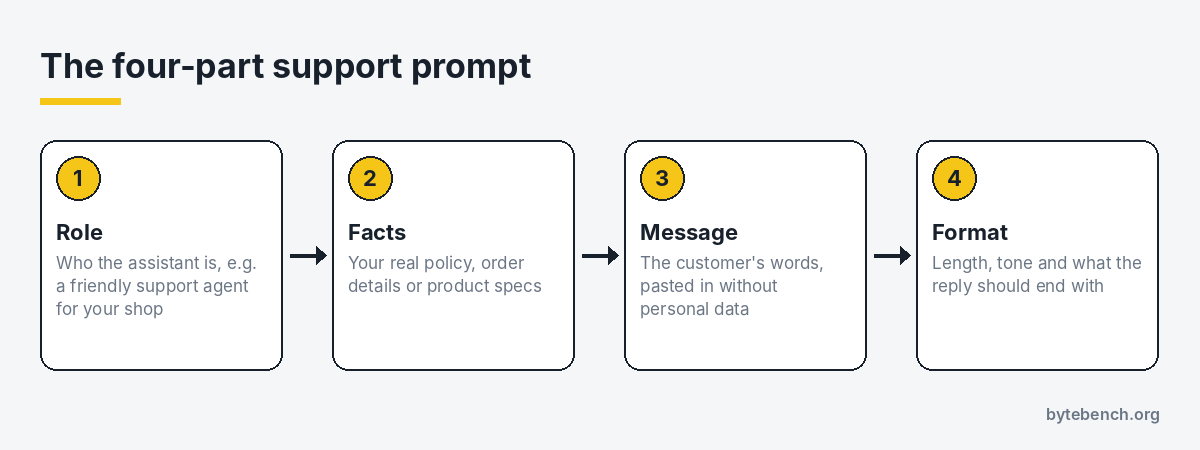
The "facts" part is the one people skip, and it's why AI replies sometimes sound confident but wrong. If you don't tell it your return window, it will guess.
Set up a reusable "house style" prompt
Before the templates, write one paragraph that describes your business and tone, and paste it at the start of every chat. For example:
You are a support agent for a small online phone accessories shop. Tone: warm, short, plain English, no jargon. Never promise refunds, discounts or dates unless they appear in the facts I give you. If information is missing, say what you need to check instead of guessing.
That last sentence is the most important one you'll write.
12 ChatGPT prompts for customer support
Replace the bits in square brackets. Each one assumes you've pasted the house style prompt first.
| # | Situation | Prompt |
|---|---|---|
| 1 | Late delivery | "Customer says order [number] hasn't arrived. Courier shows [status]. Apologise, explain, give the next update time of [time]. Under 90 words." |
| 2 | Refund request inside policy | "Our refund window is [X] days. Customer bought [Y] days ago. Confirm the refund and explain the steps." |
| 3 | Refund outside policy | "Refund window has passed. Offer [repair/exchange/store credit] instead. Be kind but clear." |
| 4 | Angry complaint | "Customer is upset about [issue]. Acknowledge feelings first, no excuses, offer [solution], ask one question." |
| 5 | Product question | "Answer using only these specs: [specs]. If the answer isn't in the specs, say we'll check." |
| 6 | Out of stock | "Item is out of stock until about [date]. Offer [alternative] and a back-in-stock message." |
| 7 | Wrong item sent | "We sent the wrong item. Apologise, explain the exchange: [steps]. Cover return shipping." |
| 8 | Price match ask | "Our price match rule is: [rule]. Reply accordingly." |
| 9 | Review reply (positive) | "Thank this customer for their review: [review]. Mention one specific detail. Two sentences." |
| 10 | Review reply (negative) | "Reply publicly to this review: [review]. Apologise, no arguing, invite them to contact [channel]." |
| 11 | Follow-up after fix | "Check in with a customer whose [issue] was fixed [days] ago. Short and friendly." |
| 12 | Summarise a long thread | "Summarise this conversation in 5 bullet points: issue, what we tried, what's promised, next step, owner." |
Save these in a shared document or your helpdesk's saved replies so the whole team uses the same versions.
Rules that keep AI replies accurate
AI drafts are only safe if a person checks them. I give every team the same short checklist:
- Does the reply promise anything not in our policy?
- Are the order number, dates and amounts correct?
- Is the customer's name spelled correctly?
- Would I be happy if the owner read this?
- Have I removed any personal data before pasting into the AI tool?
Never paste card numbers, passwords or full addresses into an AI tool. Use an order number and a first name at most.
Making replies sound human
Customers can smell a template. Three small habits fix most of it:
- Mention one specific detail from their message, like the product name or the day they ordered.
- Cut the opening fluff. Delete "I hope this message finds you well" every time.
- End with a clear next step, not "Let us know if you have any other questions."
If a reply still sounds stiff, add "Rewrite this as if you're speaking to a regular customer you like" to your prompt.
Measure whether it's working
Track two numbers for a month before and after: average first response time and the number of replies that needed a correction from a manager. If response time falls and corrections stay low, the prompts are doing their job. My post on running remote customer support for a small business covers which other support numbers are worth watching, and if your reps also take phone calls, coaching staff with call recordings pairs well with this.
Where prompts stop and process starts
Prompts speed up replies, but they don't fix a messy inbox, missing order data or unclear refund rules. If your team spends more time hunting for information than writing, the real fix is a better process: a shared inbox, saved replies linked to real order data and clear ownership.
Your next step
Pick the three situations you reply to most and turn them into prompts this week. If you'd like a hand building a support workflow around them, take a look at my customer support service.
Frequently asked questions
Can ChatGPT reply to customers automatically?
It can, but I don't recommend fully automatic replies for a small business. Let AI draft, and have a person check and send, especially for refunds and complaints.
Do these ChatGPT prompts for customer support work in other AI tools?
Yes. The structure of role, facts, message and format works with most AI assistants. You may need to tweak the wording slightly.
How do I stop AI from making up policies?
Always paste your real policy into the prompt and tell it not to promise anything that isn't in the facts. Then check every draft before sending.
Is it okay to paste customer emails into ChatGPT?
Remove names, phone numbers, addresses and payment details first. Check the tool's data settings and your local privacy rules; this is general guidance, not legal advice.