AI Tools for Small Business: A Practical Starter Guide
In this post
Every week someone asks me which AI app they should buy. Usually they have seen a viral video promising that AI will run their whole business, and they feel behind. The truth is calmer than that. AI tools for small business are very good at a handful of boring jobs, and those boring jobs are exactly where your hours disappear.
In this guide I will show you where AI genuinely helps a small team, where it does not, how to start without risking your customers' data, and a simple 30-day plan you can follow even if you have never typed a prompt before.
You don't need a big budget or a developer. You need one clear problem and a bit of patience.
Where AI actually saves time
I group the useful jobs into four buckets. If a task fits one of these, AI will probably help. If it doesn't, be sceptical.
- Writing first drafts. Product descriptions, social posts, email replies, job adverts, policy documents. AI gives you a 70% draft in seconds and you fix the rest.
- Summarising. Long email threads, meeting notes, customer reviews, supplier contracts. You paste the text in and ask for the five points that matter.
- Working with data. Explaining an Excel formula, cleaning a messy list, suggesting a pivot table, or spotting odd numbers in a sales export.
- Answering repeat questions. Opening hours, delivery times, return rules. A well-set-up assistant can draft replies so your team only checks and sends.
What AI is bad at: knowing your actual stock levels, knowing today's prices, making judgement calls about upset customers, and anything where a confident wrong answer would cost you money.
Choosing AI tools for small business: what to look for
There are hundreds of apps, and names change fast, so I won't give you a "top 10" list that is out of date next month. Instead, judge any tool against these questions.
| Question | Why it matters |
|---|---|
| Does it solve one task I do every week? | A tool you open once a month is a cost, not a saving |
| Where does my data go? | Check whether it trains on your inputs and if you can turn that off |
| Can my team use it without training? | If it needs a manual, adoption will stall |
| What does it cost per user, per month? | Small monthly fees add up across a team |
| Does it fit tools I already use? | Email, Google Workspace or Microsoft 365 add-ons save switching |
Most owners are best served by one general chat assistant plus the AI features already built into tools they pay for. Prices vary by plan and change often, so treat any figure you read as a rough guide.
How much time can you really save?
Here is an example from a typical week for a small shop owner. These are illustrative figures, not results from a real business, but they show where the hours tend to come back.
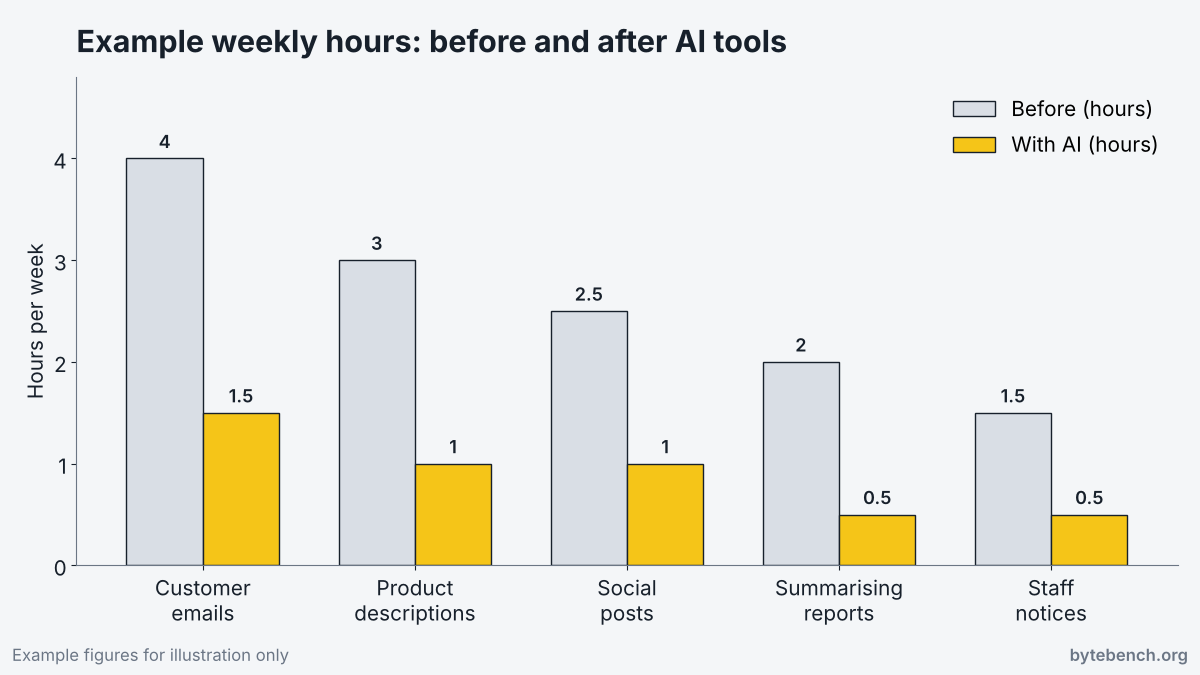
In this example, drafting customer emails drops from 4 hours to 1.5, product descriptions from 3 hours to 1, social posts from 2.5 hours to 1, summarising reports from 2 hours to 0.5, and writing staff notices from 1.5 hours to 0.5. That is 13 hours down to 4.5, a saving of 8.5 hours a week. Your numbers will be different, but measuring before and after is the only honest way to know.
Write better prompts in five minutes
The quality of what you get back depends on what you put in. I use a simple structure:
- Role: "You are a friendly customer support agent for a phone accessories shop."
- Task: "Reply to this customer who says their charger stopped working after two weeks."
- Context: "Our warranty is 30 days. We replace, we don't refund."
- Format: "Under 80 words, warm tone, end with a question."
Save your best prompts in a shared document so the whole team uses the same ones. That alone makes replies more consistent than most people manage without AI.
Keep your data and your customers safe
This is the part most viral videos skip. Before anyone on your team pastes information into an AI tool, set three rules:
- Never paste card numbers, passwords, ID numbers or full customer records.
- Remove names and phone numbers from anything you summarise.
- A human reads every AI answer before it reaches a customer.
If you handle personal data, check your local privacy rules too. This is general guidance, not legal advice.
A simple 30-day plan
- Week 1: Pick one repetitive task and time how long it takes now.
- Week 2: Try a free or low-cost AI assistant on that task only. Save the prompts that work.
- Week 3: Share the prompts with one team member and let them try.
- Week 4: Time the task again. Keep the tool if it saved real hours; drop it if not.
Then repeat with the next task. Slow and measured beats buying five subscriptions in one weekend.
If you track sales or KPIs, AI pairs well with a good reporting habit. My guide to the retail KPIs every store manager should track is a good place to decide what to measure, and when you outgrow chat prompts, automating repetitive Google Forms reports is often the next step.
When to go beyond off-the-shelf AI
Sometimes the real win isn't a chat app but a small custom tool: a form that fills a sheet, a script that emails a daily summary, or a dashboard that flags slow stores. That's where AI suggestions meet proper automation.
Your next step
Start with one task this week and measure it. If you'd like help turning a repetitive job into a proper tool, have a look at my custom tools and automation service.
Frequently asked questions
Are AI tools for small business expensive?
Many have free tiers, and paid plans are often a modest monthly fee per user. Prices change frequently and vary by country, so check the current plan before you commit.
Will AI replace my staff?
In a small business, AI mostly removes the dull parts of a job rather than the job itself. Your team still handles judgement, relationships and anything that needs care.
Is it safe to paste customer data into AI tools?
Only paste what you would be comfortable sharing with an outside company. Remove names, phone numbers and payment details, and check the tool's data settings first.
What is the best first task to try with AI?
Drafting replies to common customer questions is usually the easiest win. It is frequent, low risk, and a human can check every reply before it goes out.