Laravel AI Chatbot Integration: A Safe, Simple Starter Build
In this post
Every client conversation I have lately ends with the same question: "Can we add an AI chat to the website?" The answer is yes, and in Laravel it's surprisingly little code. The harder part is making a Laravel AI chatbot that answers from your real information, doesn't run up a surprise bill and knows when to hand over to a human.
This post is the starter structure I use. It's written for developers and technical owners, but I've kept the explanations plain so a business owner can follow the decisions. You'll get the architecture, the key pieces of code, the safety rules and a testing checklist.
I'll keep the AI provider generic. Most providers offer a similar HTTP API, and model names and prices change often, so check your provider's current documentation for exact endpoints, models and costs.
How the pieces fit together
A good chatbot is more than a text box connected to an API. Here's the flow I build:
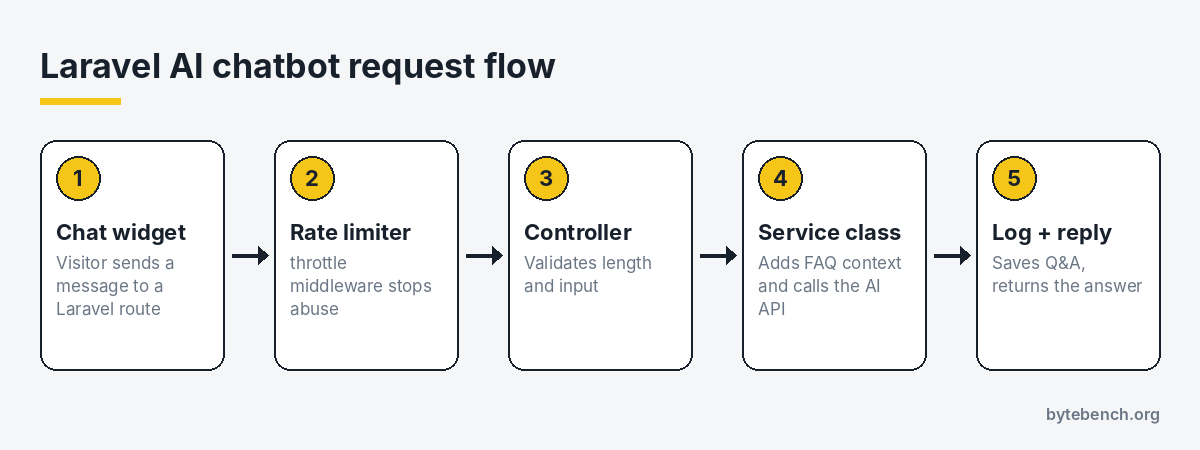
- The chat widget on the page sends the visitor's message to a Laravel route.
- A rate limiter stops abuse and runaway costs.
- A controller validates the input.
- A service class adds your business context (FAQ, policies) and calls the AI API.
- The answer is logged and returned to the widget.
Keeping the AI call inside a service class means you can switch providers later by changing one file.
Configuration first
Store the provider details in your .env file, never in code:
AI_API_URL=https://your-provider.example/v1/chat
AI_API_KEY=your-secret-key
AI_MODEL=your-chosen-model
AI_MAX_TOKENS=400
Then expose them in config/services.php:
'ai' => [
    'url' => env('AI_API_URL'),
    'key' => env('AI_API_KEY'),
    'model' => env('AI_MODEL'),
    'max_tokens' => (int) env('AI_MAX_TOKENS', 400),
],
Setting a maximum response length is your first cost control.
The Laravel AI chatbot service class
The service builds the prompt and makes the call with Laravel's HTTP client. The exact request and response shape depends on your provider, so adjust the array keys to match their documentation.
namespace App\Services;

use Illuminate\Support\Facades\Http;

class ChatAssistant
{
    public function reply(string $question): string
    {
        $context = view('chatbot.context')->render(); // your FAQ and policies

        $response = Http::withToken(config('services.ai.key'))
            ->timeout(20)
            ->post(config('services.ai.url'), [
                'model' => config('services.ai.model'),
                'max_tokens' => config('services.ai.max_tokens'),
                'messages' => [
                    ['role' => 'system', 'content' => $context],
                    ['role' => 'user', 'content' => $question],
                ],
            ]);

        if ($response->failed()) {
            return 'Sorry, I can\'t answer right now. Please contact our team.';
        }

        return data_get($response->json(), 'choices.0.message.content', 'Please contact our team.');
    }
}
Keeping the context in a Blade view means a non-developer can update the FAQ without touching PHP.
Write a system prompt that keeps it honest
The context view is where most of the quality comes from. Mine always includes:
- Who the assistant is and what business it represents.
- Your real opening hours, delivery rules, return policy and contact details.
- "Only answer using the information above. If you don't know, say so and suggest contacting the team."
- "Never promise discounts, refunds or delivery dates."
- A short tone guide: friendly, brief, plain English.
Without that "only answer from this" instruction, the model will happily guess.
I also keep the context short and focused. It's tempting to paste your whole website into the prompt, but longer context costs more on every single message and often makes answers vaguer. Start with your 15 most common questions and their exact answers, written the way you'd want a good staff member to say them. Add new entries only when the logs show visitors asking something the bot couldn't answer.
If your FAQ grows into hundreds of entries, look into retrieval: storing the content in a searchable table and only sending the few most relevant entries with each question. That's a bigger build, and most small business sites never need it.
Rate limiting and cost control
A public chat endpoint is an open door. In your route file:
Route::post('/chat', [ChatController::class, 'send'])
    ->middleware('throttle:10,1'); // 10 messages per minute per visitor
Also validate the message length in the controller (for example, a maximum of 500 characters), and consider a daily cap per IP address stored in the cache. Check your provider's dashboard for spending limits and alerts and turn them on.
| Control | Where | Why |
|---|---|---|
max_tokens |
Service config | Caps response length and cost |
throttle middleware |
Route | Stops spam and bots |
| Input length validation | Controller | Prevents huge, expensive prompts |
| Provider spending limit | Provider dashboard | Last line of defence |
| Request timeout | HTTP client | Keeps the page responsive |
Logging and handover to a human
Store each question and answer (without personal data) in a chat_logs table. Reviewing these weekly tells you which FAQ entries are missing and where the bot gets confused.
Add a clear handover: if the visitor types "human", "agent" or asks about an order, show your WhatsApp link or a contact form instead of an AI answer. Order-specific questions should go to your real systems, not a language model. If you also run a support team, my guide to remote customer support for small businesses covers how to route those handovers.
Privacy and testing checklist
Tell visitors they're chatting with an AI assistant and don't ask them for sensitive information in the chat. If you collect personal data, check the privacy rules where you and your customers are; this is general guidance, not legal advice.
Before going live:
- Ask 20 real customer questions and check every answer.
- Ask questions outside your FAQ and confirm it admits it doesn't know.
- Try to make it promise a discount and confirm it refuses.
- Hit the endpoint repeatedly and confirm throttling works.
- Disconnect the API key and confirm the friendly fallback message appears.
If you're still choosing a platform for the site itself, my comparison of Laravel vs WordPress for small businesses explains why I like Laravel for custom features like this.
Your next step
Start with your top 15 FAQs as context and a strict rate limit, then improve it from the logs. If you'd rather have it built and tested for you, see my website development service.
Frequently asked questions
How much does a Laravel AI chatbot cost to run?
It depends on your provider, model and traffic. Many small sites spend little each month, but set a spending limit and a token cap so there are no surprises.
Can the chatbot see my orders or stock?
Not unless you build that connection, and I recommend doing it carefully. For most small businesses, sending order questions to a human or a proper tracking page is safer.
Which AI provider should I use?
Choose one with clear pricing, a data policy you're comfortable with and good documentation. Keeping the call in one service class lets you switch later.
Will an AI chatbot replace my support team?
No. It handles repetitive questions well, but complaints, refunds and anything personal still need a person. Think of it as a first line, not the whole team.