Website Speed for Small Business: A Plain-English Fix List

In this post
- Why website speed for small business matters
- How to test your website speed for free
- Core Web Vitals in plain English
- The fixes that matter most
- 1. Compress and resize images
- 2. Remove scripts you don't use
- 3. Use decent hosting
- 4. Turn on caching
- 5. Limit fonts and heavy themes
- What you can do yourself vs with a developer
- Speed myths I hear often
- A monthly speed habit
- Your next step
Most customers will never tell you your website is slow. They just tap back and visit someone else. On a phone with a patchy mobile connection, a page that takes a few seconds too long feels broken.
Website speed for small business isn't about chasing a perfect score. It's about making sure a real customer on a real phone can see your products, prices and contact button quickly. In this guide I'll show you how to test your site for free, what Google's Core Web Vitals mean in plain English, and the fixes that usually make the biggest difference.
Some fixes you can do yourself today. Others need a developer, and I'll tell you which is which.
Why website speed for small business matters
Speed affects three things you care about:
- Sales and enquiries. Visitors who wait leave before they see your offer.
- Google visibility. Page experience is one of many signals Google considers. It won't beat great content, but a very slow site doesn't help.
- Ad spend. If you pay for ads, every visitor who leaves before the page loads is money wasted.
How to test your website speed for free
- Open Google's PageSpeed Insights and enter your homepage address.
- Look at the mobile results first; most small business visitors are on phones.
- Check whether there is "real user" data (field data). Small sites often don't have enough traffic, so you'll only see lab data.
- Repeat for your two or three most important pages, such as a product or contact page.
- Write down the scores so you can compare after fixes.
Test a few times; results vary a little each run.
Core Web Vitals in plain English
Google's Core Web Vitals are three measurements of how a page feels to a visitor.
| Metric | Plain-English meaning | "Good" target (Google's guidance) |
|---|---|---|
| Largest Contentful Paint (LCP) | How long until the main content appears | 2.5 seconds or less |
| Interaction to Next Paint (INP) | How quickly the page reacts when you tap | 200 milliseconds or less |
| Cumulative Layout Shift (CLS) | How much things jump around while loading | 0.1 or less |
These targets are Google's published thresholds at the time of writing; check Google's documentation if you need the latest figures.
The fixes that matter most
Here's where load time typically goes on a small business page. This is an illustrative breakdown of an example page, not a measurement of any real site, but the pattern is very common.
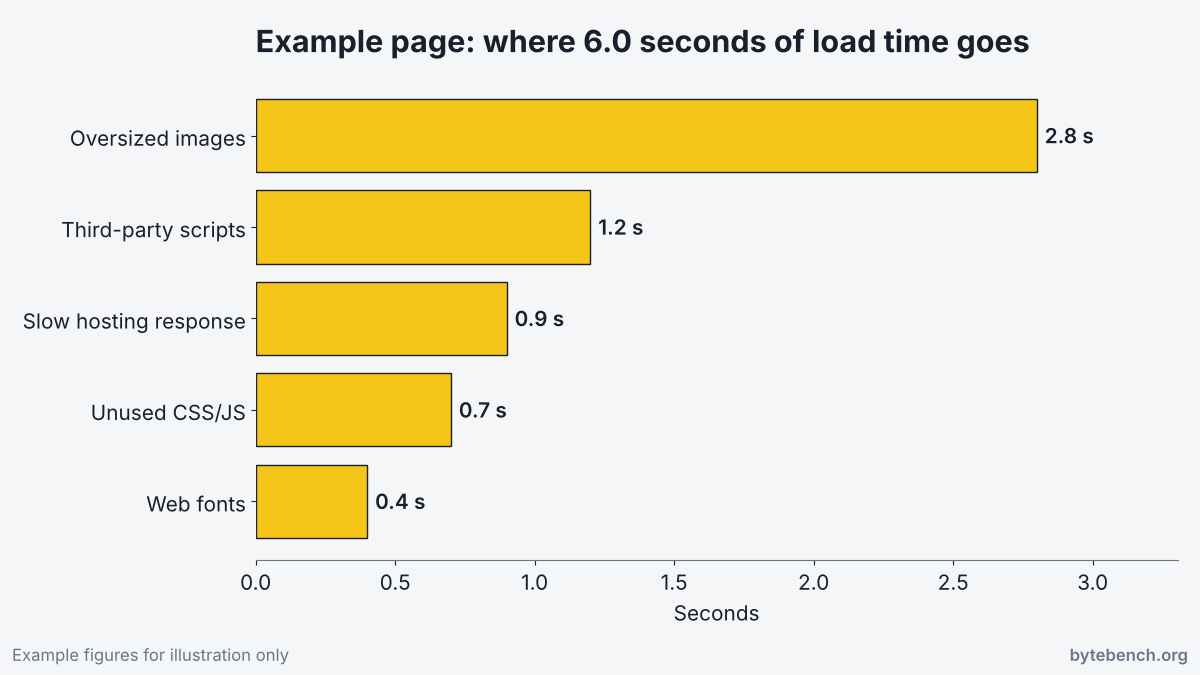
In this example, the page takes 6.0 seconds to load: oversized images take 2.8 seconds, third-party scripts like chat widgets and trackers 1.2 seconds, slow hosting response 0.9 seconds, unused CSS and JavaScript 0.7 seconds and web fonts 0.4 seconds. Images are almost half the problem, which is why I always start there.
1. Compress and resize images
Photos straight from a phone can be several megabytes. Resize them to the size they actually display, compress them and use modern formats like WebP where possible. This is often the biggest single win.
2. Remove scripts you don't use
Old tracking codes, two chat widgets, a pop-up tool you stopped paying for. Each adds weight. List every script on your site and remove anything nobody looks at.
3. Use decent hosting
The cheapest shared hosting can respond slowly at busy times. Mid-range hosting with caching and a nearby server location usually helps. Prices vary a lot by provider and country.
4. Turn on caching
Caching saves a ready-made copy of your pages so the server doesn't rebuild them for every visitor. Most platforms have a setting or plugin for this.
5. Limit fonts and heavy themes
Two font families are plenty. Bloated themes with sliders and animations look nice in a demo and slow down real visits.
What you can do yourself vs with a developer
| Fix | DIY? |
|---|---|
| Compress and resize images | Yes |
| Remove unused plugins or widgets | Yes, carefully |
| Turn on caching | Usually, via a setting or plugin |
| Upgrade hosting | Yes, with your host's help |
| Remove unused CSS/JavaScript | Developer |
| Fix layout shift and slow interactions | Developer |
| Rebuild on a lighter platform | Developer |
If you're deciding on a platform for a rebuild, my comparison of Laravel vs WordPress for small businesses explains the speed and maintenance trade-offs, and what a small business website costs in Pakistan gives a rough budget picture.
Speed myths I hear often
"My site is fast, it loads instantly for me." Your browser has probably cached it, and you may be on fast office Wi-Fi. Test in a private window on mobile data to see what a new customer sees.
"I need a score of 100." Scores are a guide, not the goal. A page scoring in the 70s that shows products quickly is far better than a 100-point page that's empty and unhelpful.
"More plugins will speed it up." Installing three different speed plugins often makes things worse, because they clash. One well-configured caching setup is usually enough.
"Speed is a one-off job." Every new photo, banner and tracking code adds weight. Speed is maintenance, like cleaning the shop floor.
A monthly speed habit
Speed slowly gets worse as you add products, photos and plugins. Once a month:
- Test your homepage and one key page on mobile.
- Check new images were compressed before upload.
- Review any new plugins or scripts added.
- Note scores in a simple sheet.
Your next step
Run PageSpeed Insights on your homepage today and fix your images first. If the remaining issues need a developer, my website development service covers speed fixes and lightweight rebuilds.
Frequently asked questions
What is a good speed score for website speed for small business?
Don't obsess over a perfect 100. Aim for the main content to appear within about 2.5 seconds on mobile and for the page to feel responsive when tapped.
Does website speed affect Google rankings?
Page experience is one of many ranking signals. Relevant, helpful content matters more, but a very slow site can hold you back and loses visitors either way.
Will a faster website increase my sales?
A faster site removes a reason for visitors to leave, so it usually helps enquiries and sales. The size of the effect varies by business, so measure before and after.
Why is my website fast on Wi-Fi but slow on my phone?
Mobile connections are slower and phones have less processing power. That's why you should always test mobile results first.