Google Business Profile Checklist: Get Found by Local Customers
In this post
- Why your Google listing matters so much
- Step 1: Claim and verify the profile
- Step 2: The Google Business Profile checklist for basics
- Step 3: Photos that make people visit
- Step 4: Build a steady flow of reviews
- How to reply to reviews
- Step 5: Keep the profile active
- Step 6: Check your numbers monthly
- Common mistakes to avoid
- Your next step
When someone nearby searches for a phone shop, a bakery or a plumber, they usually don't visit ten websites. They look at the map results, check the photos and reviews, and tap "Call" or "Directions". If your Google listing is half-finished, that customer goes to the shop next door.
This Google Business Profile checklist walks you through every part of the listing that matters, in the order I'd fix it. It's free, it takes a couple of hours to get right, and it often brings more walk-ins than a new website.
I'll cover the basics, photos, reviews, posts and the few numbers worth checking each month.
Why your Google listing matters so much
For a local business, the profile is your shop window online. It shows your hours, location, phone number, photos and reviews before anyone reaches your website. A complete, active profile is also one of the signals Google uses to decide which local businesses to show, alongside how close the customer is and how well-known you are. Nobody outside Google knows the exact formula, so focus on what you control: accuracy, completeness and activity.
Step 1: Claim and verify the profile
- Search for your business name on Google Maps to see whether a listing already exists.
- If it does, request access. If not, create a new profile.
- Verify it. Google may offer a phone call, text, email, video or postcard depending on your business and region.
- Add a second owner or manager you trust, so you never lose access if one account is locked.
Step 2: The Google Business Profile checklist for basics
| Item | What good looks like |
|---|---|
| Business name | Your real name only, no extra keywords stuffed in |
| Primary category | The single most accurate category, e.g. "Cell phone store" |
| Extra categories | 2–4 that genuinely apply |
| Address or service area | Exact address, or service areas if you visit customers |
| Phone | A number that's actually answered |
| Website | Your homepage or a relevant landing page |
| Hours | Regular hours plus special hours for holidays |
| Description | 2–3 plain sentences on what you sell and who you help |
| Products/services | Your main items with short descriptions and prices if possible |
Stuffing keywords into the business name can get a listing suspended, so keep it honest.
Step 3: Photos that make people visit
Listings with good photos simply look more trustworthy. Aim for a starting set of:
- 3 exterior photos (so people recognise the shop from the street)
- 3 interior photos (counter, displays, waiting area)
- 5–10 product photos
- 1–2 team photos, only with staff permission
- Your logo and a cover image
Use natural light, keep the shop tidy and add a few new photos every month.
Step 4: Build a steady flow of reviews
Reviews influence both customers and rankings. The best approach is simple and steady:
- Ask happy customers in person at the end of a sale.
- Share your review link by WhatsApp or on the receipt.
- Never pay for reviews or offer discounts in exchange; it breaks Google's rules.
- Reply to every review, good or bad, within a few days.
Here's how review counts typically build up when a shop starts asking consistently. These are example figures to show the pattern, not data from a real business.
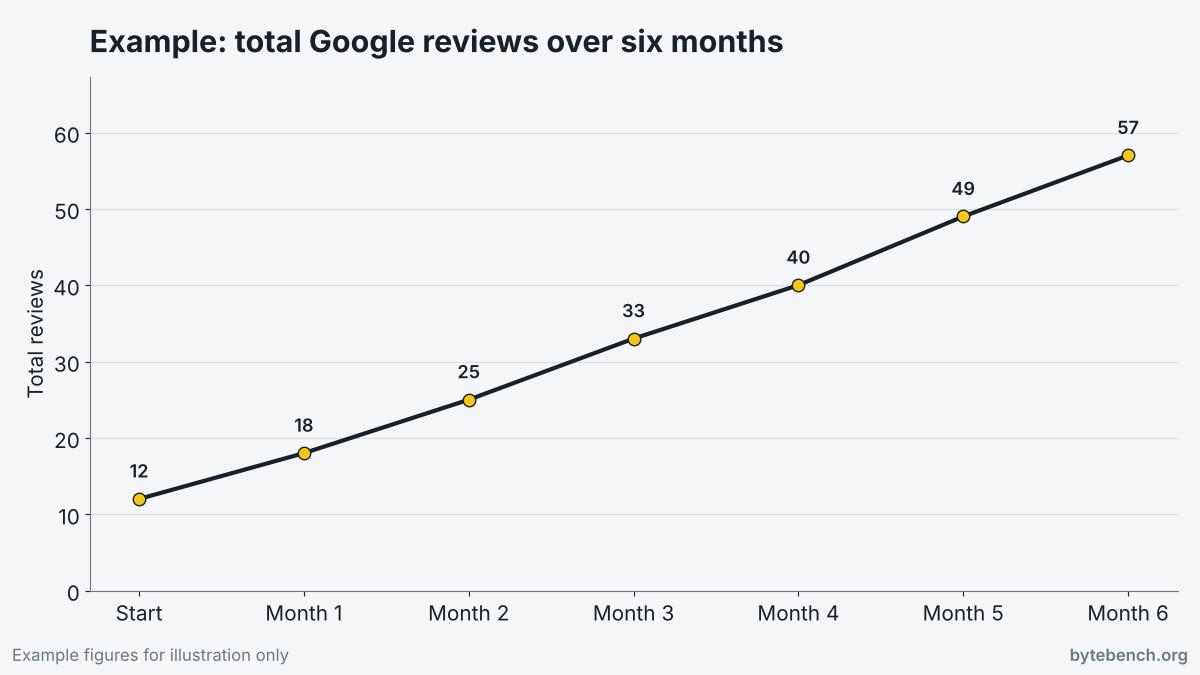
In this example the shop had 12 reviews at the start, then asked every happy customer: 18 after month one, 25 after month two, 33 after month three, 40 after month four, 49 after month five and 57 after month six. No big campaign, just asking every day.
How to reply to reviews
Replying is part of the checklist, so here's a simple formula. For positive reviews, thank the person by name and mention one detail they wrote about. For negative reviews, apologise for their experience, avoid arguing in public and invite them to contact you directly so you can sort it out. Keep both short, two or three sentences, and never share a customer's personal details in a reply.
Step 5: Keep the profile active
Google rewards listings that look alive. Once a week or so:
- Post an update: a new product, an offer, a holiday notice.
- Answer questions in the Q&A section.
- Update hours before public holidays.
- Add fresh photos.
Set a recurring 15-minute reminder in your calendar. That's enough for most small shops.
Step 6: Check your numbers monthly
The profile's performance section shows how people found you and what they did. Each month, note:
- Searches and views
- Calls from the profile
- Direction requests
- Website clicks
Put these in the same sheet you use for other store numbers. If you track sales across locations, my guide to tracking daily sales KPIs across multiple stores shows a simple layout, and if your website is part of the plan, see what a small business website costs in Pakistan.
Common mistakes to avoid
- Duplicate listings. Two listings for the same shop split your reviews and confuse customers. Ask Google to merge or remove the extra one.
- Old hours. Nothing annoys a customer more than driving to a closed shop. Update special hours before every public holiday.
- A phone number nobody answers. If calls go unanswered, people leave a one-star review instead.
- Ignoring negative reviews. A calm, polite reply shows future customers that you care, even if you can't fix the original problem.
- A P.O. box or virtual office as the address. This breaks Google's guidelines and can get the listing suspended.
Your next step
Block two hours this week and work through the checklist from top to bottom. If you want a website that matches your profile and turns those clicks into enquiries, my website development service can help.
Frequently asked questions
Is a Google Business Profile free?
Yes, creating and managing a Google Business Profile is free. Be wary of anyone who calls claiming you must pay to keep your listing.
How long does it take to appear on Google Maps?
After verification, a listing often appears within days, but it can take longer. Ranking well takes consistent effort over weeks and months.
Can I have a profile without a shop address?
Yes. Service-area businesses can hide their address and list the areas they serve instead. You still need a real address for verification.
How often should I go through this Google Business Profile checklist?
Do the full checklist once, then review it every three months. Weekly posts, monthly photos and replying to reviews keep it active in between.